Being a newcomer in Canada can be overwhelming. With two national languages to a rich legacy of , and , there's a lot to learn.
Tap arts, history, or cultural references to ask Beaver
EnglishCanada Groceries and Essentials Benefit payment
EspañolPago del Beneficio Canadiense para Comestibles y Artículos Esenciales
Canada Revenue AgencyEnglishTax instalment due, if you pay by instalments
EspañolVence el pago a plazos del impuesto, si paga a plazos
Canada Revenue AgencyEnglishFile your 2026 tax return and pay any balance
EspañolPresente su declaración de 2026 y pague cualquier saldo
Canada Revenue AgencyEnglishRenew your permanent resident card
EspañolRenueve su tarjeta de residente permanente
Immigration, Refugees and Citizenship CanadaEnglishThis is a Notice of Assessment from the Canada Revenue Agency.
中文這是加拿大稅務局寄來的評稅通知書。
EnglishIt confirms your 2025 tax return was processed.
中文它確認您2025年的報稅表已處理完畢。
EnglishYou owe nothing, and you do not need to reply.
中文您無需繳款,也不需要回覆。
Summarized on this laptop. The photo was not sent anywhere.
| English | Français | Español | Meaning |
|---|
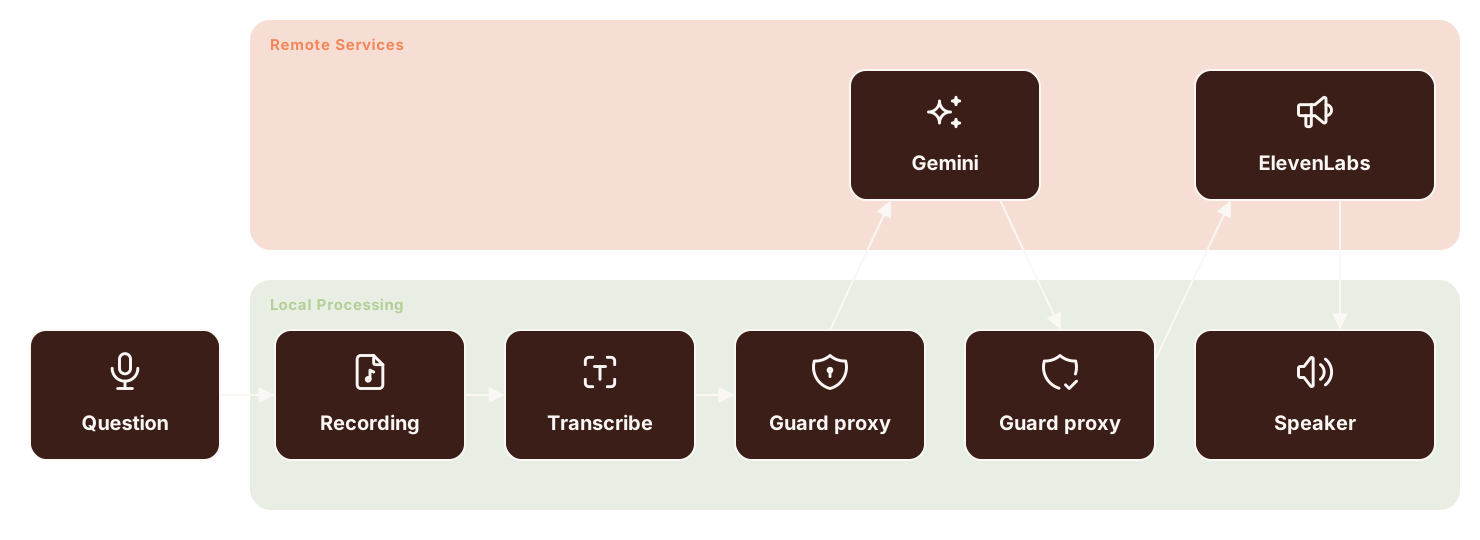
Hold the button while you ask your question. Beaver answers through the rover's speaker.
Hold to talkBeaver is answering through the rover's speaker.
Hold to talkما تنظر إليه هو برج السلام (Peace Tower) في أوتاوا. هل تود معرفة المزيد عن التاريخ أو الهندسة المعمارية؟
Beaver is answering through the rover's speaker.
Hold to talkSolicite OHIP en persona en un centro de ServiceOntario. Lleve el formulario de registro y tres documentos: uno de su estatus, uno de su domicilio en Ontario y uno de su identidad. No hay período de espera.
هل يمكنك أن تأخذني في جولة في أرجاء مبنى البرلمان؟
Can you give me a tour of the Parliament grounds?
What you are looking at is The Peace Tower.
ما تنظر إليه هو برج السلام (Peace Tower) في أوتاوا.
Would you like to know more about the history or architecture?
هل تود معرفة المزيد عن التاريخ أو الهندسة المعمارية؟
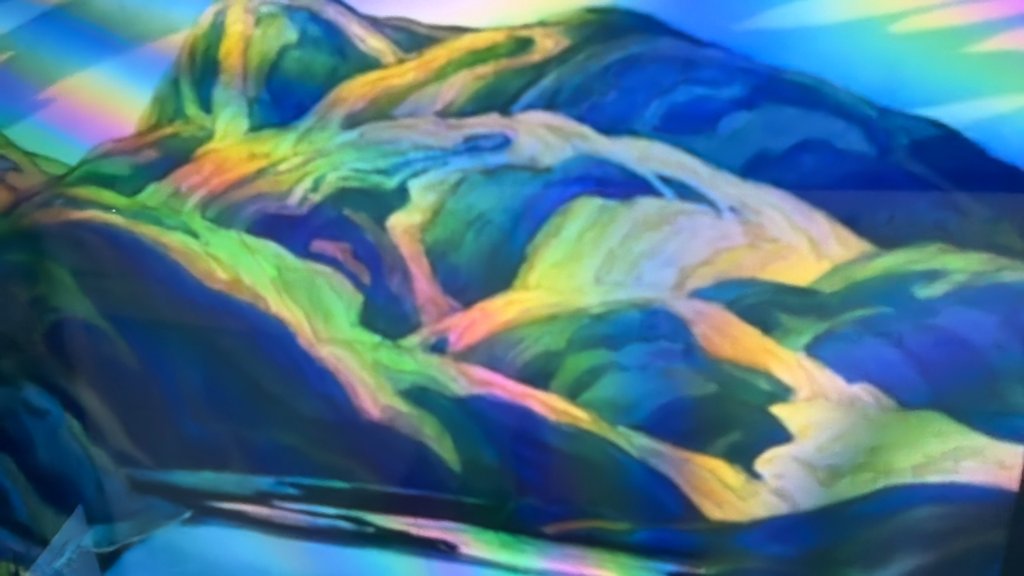
Tell me more about the artist of this painting.
Cuéntame más sobre el artista de esta pintura del museo.
Stormy Weather, Georgian Bay is a famous 1921 oil painting by Canadian artist and Group of Seven founding member F.H. Varley.
Stormy Weather, Georgian Bay es un famoso óleo de 1921 del artista canadiense y miembro fundador del Grupo de los Siete, F.H. Varley.
What is poutine all about?
Poutine到底是什麼?
Poutine is a classic Quebec dish!
Poutine(起司肉汁薯條)是起源於加拿大魁北克省的國民級經典美食!
It contains three main elements: French fries, cheese curds, and rich gravy.
它包含三個主要元素:薯條、起司塊(Cheese Curds)、濃郁肉汁(Gravy)。
Start the rover from the desktop app and scan its code. Your phone becomes Beaver's microphone, and Beaver answers out loud through the rover.
Point the rover at what you see and ask in your language. Beaver looks through its camera and answers.
هل يمكنك أن تأخذني في جولة في أرجاء مبنى البرلمان؟
Can you give me a tour of the Parliament grounds?
Ask how something works here, and Beaver walks you through it.
¿Cómo obtengo mi tarjeta de salud de Ontario?
How do I get an Ontario health card?
At home, the desktop app keeps what the rover heard. Every question, from the rover or typed at home, becomes a notebook of new words and big ideas in three languages.
Beaver lists your upcoming tax, benefit, and immigration deadlines, each taken from the government page that states it.
Photograph a letter you can't read. Beaver summarizes it in your language, on your own computer.
Point Beaver at a painting and ask in Spanish. Beaver answers sentence by sentence in English, French, and Spanish, so every new word comes with its translation.
Beaver meets a newcomer in two places. Out in the city, the rover answers a question about what they see, asked from their phone. At the laptop, the desktop app answers their longer questions and keeps every exchange from both places as notebooks.
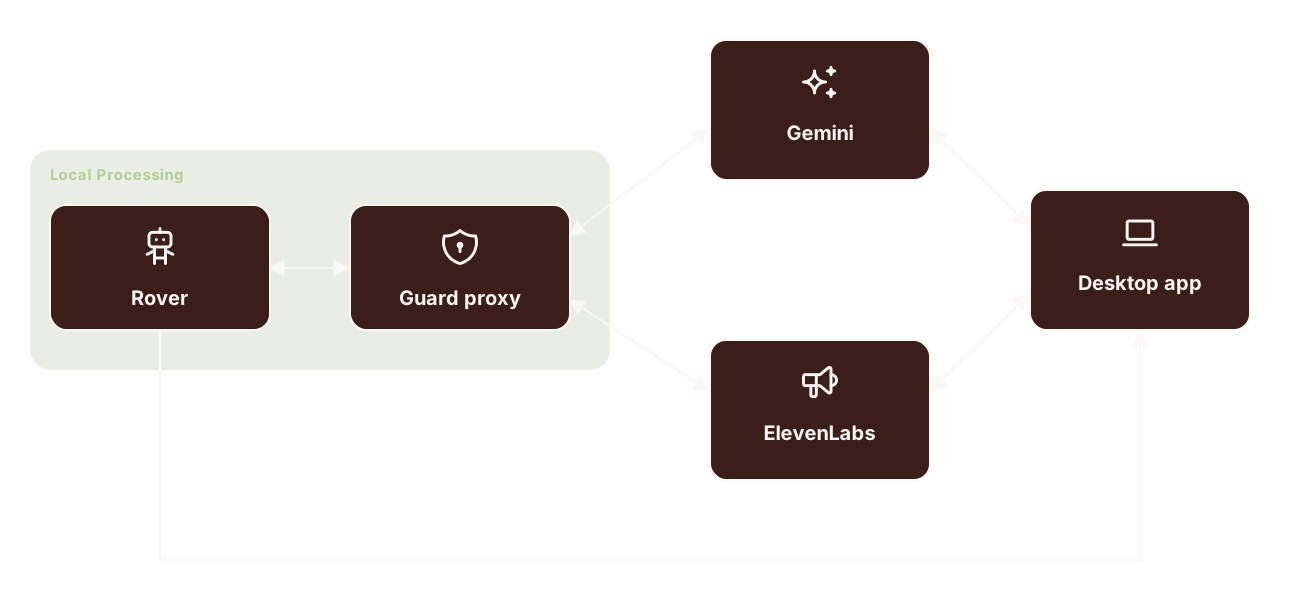
A question about duties, documents, or deadlines can carry a phone number, an address, or a card number. The guard proxy keeps those on the rover.